|
Questa pagina in italiano |
(Last updated: 08/05/26)
TrID - File Identifier
TrID is an utility designed to identify file types from their binary
signatures. While there are similar utilities with hard coded
logic, TrID has no fixed rules. Instead, it's extensible and can
be trained to recognize new formats in a fast and automatic way.
TrID has many uses: identify what kind of file was sent to you via e-mail,
aid in forensic analysis, support in file recovery, etc.
TrID uses a database of definitions which describe
recurring patterns for supported file types. As this is subject to
very frequent update, it's made available as a separate package.
Just download both TrID and this archive and unpack in the same folder.
The database of definitions is constantly expanding; the more that
are available, the more accurate an analysis of an unknown file can
be. You can help! Use the program to both recognize unknown file
types and develop new definitions that can be added to the library.
See the TrIDScan page for information about how you can help.
Just run the TrIDScan module against a number of files of a given type.
The program will do the rest.
Because TrID uses an expandable database it will never be out of
date. As new file types become available you can run the scan
module against them and help keep the program up to date. Other
people around the world will be doing the same thing making the
database a dynamic and living thing.
If you have special file formats that only you use, you can also
add them to your local database, making their identification
easier.
To get you started, the current library of definitions is up
to 21323 file types and growing fast.
TrID is simple to use. Just run TrID and point it to the file to be
analyzed. The file will be read and compared with the definitions in the database.
Results are presented in order of highest probability.
 C:\TrID>trid c:\test\doc\lasik_info.doc
 TrID - File Identifier v2.48 - (C) 2003-2026 By M.Pontello

 Loading definitions from file: triddefs.trd
   (Reading from cache...)
 Definitions found: 20046
 Analyzing...

 File: c:\test\doc\lasik_info.doc
  70.7% (.DOC) Microsoft Word document (58000/1/5)
29.3% (.) Generic OLE2 / Multistream Compound File (24000/1/0) |
 C:\TrID>trid c:\Download\AvBatEx.bav
 TrID - File Identifier v2.48 - (C) 2003-2026 By M.Pontello

 Loading definitions from file: triddefs.trd
   (Reading from cache...)
 Definitions found: 20046
 Analyzing...

 File: c:\Download\AvBatEx.bav
  75.8% (.BAV) The Bat! Antivirus plugin (187530/5/21)
  15.2% (.EXE) Win32 Executable MS Visual C++ (generic) (37706/45/16)
   4.3% (.EXE) Win32 Executable Generic (10527/13/4)
   3.1% (.DLL) Win32 Dynamic Link Library (generic) (7600/42/2)
0.8% (.EXE) Generic Win/DOS Executable (2002/3) |
Wildcards can be used to scan groups of files, entire folders, etc. In addition, using the switch
-ae will instruct TrID to add the guessed extensions to the filenames. This come handy,
for example, when working with files recovered by data rescue softwares. For example:
 C:\TrID>trid c:\temp\* -ae
 TrID - File Identifier v2.48 - (C) 2003-2026 By M.Pontello

 Loading definitions from file: triddefs.trd
   (Reading from cache...)
 Definitions found: 20046
 Analyzing...

 File: c:\temp\FILE0001.CHK
  75.8% (.BAV) The Bat! Antivirus plugin (187530/5/21)

 File: c:\temp\FILE0002.CHK
  77.8% (.OGG) OGG Vorbis Audio (14014/3/0)

 File: c:\temp\FILE0003.CHK
  86.0% (.DOC) Microsoft Word document (49500/1/4)

 File: c:\temp\FILE0004.CHK
  42.6% (.EXE) UPX compressed Win32 Executable (30569/9/7)

4 file(s) renamed. |
At this point, the files in the c:\temp folder will look like:
FILE0001.CHK.bav
FILE0002.CHK.ogg
FILE0003.CHK.doc
FILE0004.CHK.exe
Instead, the switch -ce will just change the file extension to the new one; if the
file has no extension, the new one will be added. For example:
IAmASoundFile.dat -> IAmASoundFile.wav
IAmABitmap -> IAmABitmap.bmp
TrID can get a file list from a file, with the -f switch.
So it's possible to work on an entire folder tree, or a particular subset of files, just
using a list built with some or other tool. Something like:
 C:\TrID>trid -f d:\recovered_drive\filelist.txt
 TrID - File Identifier v2.48 - (C) 2003-2026 By M.Pontello

 Loading definitions from file: triddefs.trd
   (Reading from cache...)
 Definitions found: 20046
 Analyzing...

 File: d:\recovered_drive\notes
 100.0% (.RTF) Rich Text Format (5000/1)

 File: d:\recovered_drive\temp\FILE0001.CHK
  77.8% (.OGG) OGG Vorbis Audio (14014/3)
 ...
|
It's possible to tell TrID to show some more information about every match
(such as the mime type, who created that definition, how many files were scanned, etc.);
and it's also possible to limit the number of results shown.
The switch -v activate the verbose mode, and -n num specifies the max number
of matches that TrID will display (default is 5).
 c:\TrID>trid "\t\Windows XP Startup.ogg" -v -n 2
 TrID - File Identifier v2.48 - (C) 2003-2026 By M.Pontello

 Loading definitions from file: triddefs.trd
   (Reading from cache...)
 Definitions found: 20046
 Analyzing...

 File: \t\Windows XP Startup.ogg
  77.8% (.OGG) OGG Vorbis audio (14014/3/0)
          Mime type  :  audio/ogg
          Related URL:  http://www.xiph.org/ogg/vorbis/
        Definition   :  audio-ogg-vorbis.trid.xml
          Files      :  37
        Author       :  Marco Pontello
          E-Mail     :  marcopon@gmail.com
          Home Page  :  http://mark0.net
  22.2% (.OGG) OGG stream (generic) (4000/1/0)
          Related URL:  http://www.xiph.org/
        Definition   :  ogg-stream.trid.xml
          Files      :  35
        Author       :  Marco Pontello
          E-Mail     :  marcopon@gmail.com
Home Page : http://mark0.net |
When starting, TrID will check for the TrIDDefs.TRD definitions package in the current
directory. If not found, it will search on the some folder where TrID is installed.
Eventually, it's possible to specify a particular defs file with the switch -d filespec.
To force TrID to wait for a key after showing the results, the -w switch
is provided.
To speed up the process of getting the latest updated definitions,
it's possible to use the --update switch (or the TrIDUpdate Python script, for older versions).
It first compare the MD5 digest of the current TRD file and the one available online, so if the file
isn't changed it's very quick. For example:
 c:\TrID>trid --update
 TrID - File Identifier v2.48 - (C) 2003-2026 By M.Pontello

 TrID defs package triddefs.trd - Checking for updates...
 File triddefs.trd not found
 Checking last version online...
 MD5: 27750cda2cb5addb7e687b923da49b81
 Downloading new defs...
 File size: 2390KB
 Checking defs integrity...
 OK.

 c:\TrID>trid --update
 TrID - File Identifier v2.48 - (C) 2003-2026 By M.Pontello

 TrID defs package triddefs.trd - Checking for updates...
 MD5: 27750cda2cb5addb7e687b923da49b81
 Checking last version online...
 MD5: 27750cda2cb5addb7e687b923da49b81
Current defs are up-to-date. |
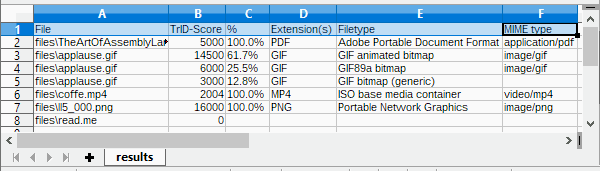
It's also possible to create a CSV file with the results, ready to be parsed by another app,
imported in a spreadsheet, etc:
 c:\TrID>trid files\* --out results.csv
 TrID - File Identifier v2.48 - (C) 2003-2026 By M.Pontello

 Loading definitions from file: triddefs.trd
   (Reading from cache...)
 Definitions found: 20062
 Analyzing...

 File: files\TheArtOfAssemblyLanguage.pdf
 100.0% (.PDF) Adobe Portable Document Format (5000/1/0)

 File: files\applause.gif
  61.7% (.GIF) GIF animated bitmap (14500/1/2)
  25.5% (.GIF) GIF89a bitmap (6000/1/0)
  12.8% (.GIF) GIF bitmap (generic) (3000/1/0)

 File: files\coffe.mp4
 100.0% (.MP4) ISO base media container (2004/2/0)

 File: files\ll5_000.png
 100.0% (.PNG) Portable Network Graphics (16000/1/0)

 File: files\read.me
        Unknown!

 CSV file 'results.csv' written (7 rows).
|
For any info or question, feel free to contact me or take a look in the forum!
|
Download
TrID is free for personal / non commercial use.
|
multiplatform
|
TrID v2.48,
20KB ZIP
- (PGP sig) (Python 3 required)
|
|
Win/x86-64
|
TrID v2.48,
8216KB ZIP
- (PGP sig) (Installer, Windows x86-64bit, from Win 10 and up)
|
|
|
TrIDDefs.TRD package,
2602KB ZIP
(21323 file types, 08/05/26)
|
Older versions still available, for older/non supported platforms.
|
Win32
|
TrID v2.24,
47KB ZIP
- (PGP sig) (Windows, from XP and up)
|
|
Linux/x86
|
TrID v2.24,
357KB ZIP
- (PGP sig)
|
|
Linux/x86-64
|
TrID v2.24,
421KB ZIP
- (PGP sig)
|
|
DOS
|
TrID v2.25,
97KB ZIP
|
|
multiplatform
|
TrIDUpdate v1.10,
1KB ZIP
(Python required)
|
 TrID's Definitions DB changes log feed! TrID's Definitions DB changes log feed!
If TrID proved useful to you, maybe you can write a comment here in the forum!
If you like TrID, you may consider a little donation!
Even a couple of $ or mBTC will let me know that you appreciate my work! Thanks!
Bitcoin: 1Mark1tF6QGj112F5d3fQALGf41YfzXEK3

Huawei Y7 Prime 2018 Custom Rom [verified] May 2026
Unlocking the Full Potential: A Review of Huawei Y7 Prime 2018 Custom ROM
The Huawei Y7 Prime 2018, a budget-friendly smartphone that was once a solid mid-ranger, has been given a new lease on life thanks to the world of custom ROMs. As a user who's dabbled in the world of Android customization, I was excited to dive into the world of custom ROMs on my Y7 Prime 2018. In this review, I'll share my experience with one of the most popular custom ROMs available for this device.
The Stock Experience: A Quick Recap
Before we dive into the custom ROM experience, let's quickly recap the stock experience. The Huawei Y7 Prime 2018 came with Android 8.0 Oreo out of the box, with Huawei's EMUI 8.0 skin on top. While it was a solid experience, it was clear that the device was missing some premium features, and the software updates were scarce.
The Custom ROM: A New World
I opted for the popular AOSP Extended ROM, which is based on Android 10. The installation process was relatively straightforward, thanks to the active community and readily available resources. After wiping my data and flashing the ROM, I was greeted with a fresh, Google-Play Services-enabled Android experience.
What's Changed?
The AOSP Extended ROM brings a host of changes and improvements over the stock experience: huawei y7 prime 2018 custom rom
- Latest Android Version: With Android 10, I get the latest security patches, features, and UI updates.
- Google Play Services: No more missing Google apps or limited functionality; I have access to the full suite of Google services.
- Cleaner UI: The ROM features a clean, AOSP-inspired UI that's free from bloatware and redundant apps.
- Better Performance: The ROM is optimized for performance, with tweaks that result in smoother animations, faster app launching, and improved overall responsiveness.
- Enhanced Customization: I can now customize my device to my heart's content, with options to tweak the look and feel of the interface.
The Verdict
The Huawei Y7 Prime 2018 custom ROM experience has been a revelation. The AOSP Extended ROM has breathed new life into my device, providing a modern, feature-rich experience that's on par with more expensive devices.
Pros:
- Latest Android version
- Google Play Services included
- Cleaner UI
- Better performance
- Enhanced customization options
Cons:
- Initial installation process can be daunting for beginners
- Some features may not work as expected (e.g., camera performance)
Conclusion
If you're a Huawei Y7 Prime 2018 owner looking to unlock your device's full potential, I highly recommend exploring the world of custom ROMs. The AOSP Extended ROM is an excellent option, offering a stable, feature-rich experience that's well worth the effort.
Rating: 4.5/5
Recommendation: If you're new to custom ROMs, be sure to follow a reputable guide and take necessary precautions to avoid bricking your device. With the right mindset and resources, you can unlock a world of possibilities on your Huawei Y7 Prime 2018.
Unlocking the Full Potential of Huawei Y7 Prime 2018 with Custom ROMs
The Huawei Y7 Prime 2018, also known as the Huawei Enjoy 8, is a budget-friendly smartphone that was released in 2018. While it came with Android 8.0 Oreo out of the box, its software experience may seem dated compared to newer devices. However, thanks to the world of custom ROMs, users can breathe new life into their device and experience the latest Android versions and features.
Why Install a Custom ROM?
There are several reasons why users may want to install a custom ROM on their Huawei Y7 Prime 2018:
- Latest Android Version: Custom ROMs can provide access to newer Android versions, even if the device is no longer receiving official updates.
- Customization: Custom ROMs often offer more customization options compared to stock firmware, allowing users to personalize their device to their liking.
- Performance: Some custom ROMs are optimized for performance, which can result in a smoother and more responsive user experience.
- New Features: Custom ROMs can include features not found in the stock firmware, such as gesture navigation, dark mode, or advanced camera capabilities.
Popular Custom ROMs for Huawei Y7 Prime 2018
Some popular custom ROMs for the Huawei Y7 Prime 2018 include: Unlocking the Full Potential: A Review of Huawei
- AOSP Extended: A popular custom ROM based on the Android Open Source Project (AOSP), offering a clean and intuitive interface.
- LineageOS: A well-known custom ROM that provides a close-to-stock Android experience, with regular updates and security patches.
- Resurrection Remix: A feature-rich custom ROM that combines elements from various other ROMs, offering a unique user experience.
Before Installing a Custom ROM
Before installing a custom ROM on your Huawei Y7 Prime 2018, make sure to:
- Unlock the bootloader: This is a necessary step to install custom firmware on the device.
- Backup your data: Installing a custom ROM will wipe all data on the device, so make sure to backup your important files and data.
- Charge your device: Ensure your device has sufficient battery life to complete the installation process.
Installation Process
The installation process for a custom ROM on the Huawei Y7 Prime 2018 typically involves:
- Downloading the ROM: Download the custom ROM and Google Apps (if necessary) from the ROM's official website or a reputable source.
- Booting into recovery: Boot the device into recovery mode using a key combination (usually Volume Down + Power).
- Wiping data: Wipe all data on the device to ensure a clean installation.
- Installing the ROM: Install the custom ROM and Google Apps (if necessary) using the recovery menu.
Conclusion
Installing a custom ROM on the Huawei Y7 Prime 2018 can breathe new life into the device and provide access to newer Android versions, customization options, and features. However, it's essential to carefully research and choose a reputable custom ROM, and follow the installation process carefully to avoid any issues.
4. Pixel Experience (Android 10/11)
- Turns your Huawei into a Google Pixel.
- Unlimited Google Photos storage (workaround).
- Call screening, Pixel launcher.
- Note: Android 11 build is less stable than the Android 10 version.
1. LineageOS 17.1 (Android 10)
- Most stable. Daily driver material.
- Based on AOSP, very close to stock Android.
- Features: Privacy Guard, system profiles, LiveDisplay.
- Known bug: VoLTE may not work; flashlight sometimes lags.
Part 8: Should You Even Bother in 2025?
The Huawei Y7 Prime 2018 remains usable, but specs are aging: Latest Android Version : With Android 10, I
- Snapdragon 430 + 3GB RAM struggles with heavy apps like TikTok or Genshin Impact.
- eMMC storage is slow – even custom ROMs won’t fix hardware limits.
|
|