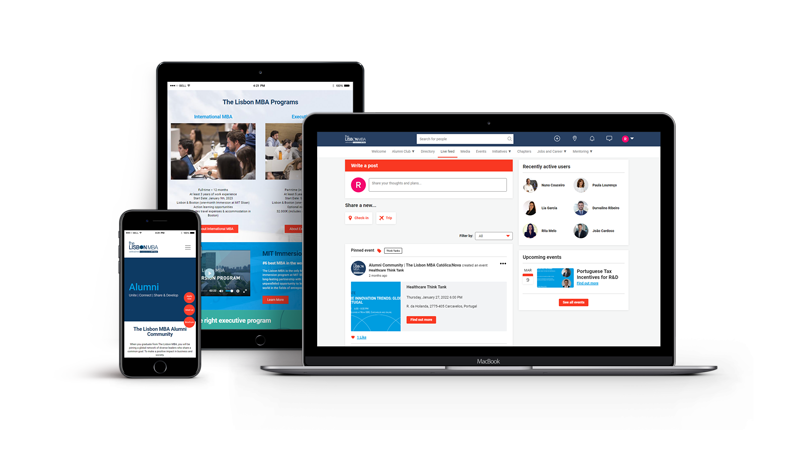
March 30 – The Lisbon MBA Alumni Portal
On March 30, discover the NEW Alumni Portal. Harness your network and engage with your global community. Unite. Connect. Share & Develop.
The USB cable clicked into place, a sound more final than a door slamming shut. Elias stared at the small, blue PCB of the Rockchip board. It was a refugee from a cheap tablet, its screen a spiderweb of cracks, its soul locked away by a ghost: FRP. Factory Reset Protection.
It wasn't his tablet. It belonged to Mrs. Gable, the elderly woman in 4B who had bought it second-hand. Her grandson had tinkered, forgotten the email, and then abandoned the device to a drawer. Now, she just wanted to see photos of her late husband. "It's just a brick, dear," she’d said, handing it over. "Don't waste your time."
But Elias saw it differently. The device wasn't dead; it was just speaking a language he understood. The FRP lock was a bureaucratic error in silicon form—a digital "access denied" stamp. And he had the master key: the Rockchip FRP Remove Tool v2.3.
The software was ugly. A grey window with blunt buttons, no splash screen, no mercy. He’d found it on a forgotten Russian forum, buried under layers of "thanks" and "mirror links." Antivirus screamed. Smart people warned of Trojans. But Elias knew the truth: real power always looks dangerous.
He selected the correct COM port, the one that only appeared when you shorted the NAND pins just right, tricking the CPU into Mask ROM mode. The tablet was no longer a tablet. It was a raw, exposed nerve.
He clicked Start.
The log window flickered.
[INFO] Detected Rockchip RK3229 in loader mode.
[INFO] Sending bootcode...
[INFO] Bypassing secure boot...
The tablet’s screen, dead for months, flickered to life. A command line scrolled by—ancient Unix lineage, the ghost in the machine. Elias wasn't hacking. He was performing surgery.
[INFO] Mounting /metadata.
[INFO] Locating FRP database...
His heart didn't race. This was methodical. The FRP lock wasn't a wall; it was a single bit of data in a hidden partition. A 0 needed to become a 1. A false needed to become a true.
[INFO] FRP trigger found at offset 0x1F4A.
[WARN] This will wipe the 'persistent' data block. Proceed?
He hesitated. Not out of fear, but out of respect. This tool wasn't for stealing phones. It was for liberating them from forgotten passwords, from dead owners' accounts, from the digital ghosts that haunted perfectly good hardware. He clicked Yes.
[INFO] Writing zero block...
[INFO] FRP status: RESET.
[INFO] Rebooting device...
The tablet's screen went black. Then, the logo appeared. No password prompt. No "verify your account." Just the cheerful, empty home screen of a fresh Android install. The ghost was gone.
Elias unplugged the cable. He wiped the screen clean, installed a simple photo gallery app, and copied over a folder of scanned Polaroids he’d asked Mrs. Gable for. A young man in an army uniform. A wedding. A garden.
He walked upstairs and knocked on 4B.
She opened the door, her eyes tired. "Any luck, dear?"
He handed her the tablet. The first photo was already on screen: her husband, smiling in 1973.
"Oh," she whispered, her thumb tracing the glass as if touching his face. "Oh, Elias."
He just smiled. "It just needed the right tool."
The Ultimate Guide to Rockchip FRP Removal Tools: Regain Access to Your Device
Getting locked out of your own tablet or TV box because of a forgotten Google account can be incredibly frustrating. This security feature, known as Factory Reset Protection (FRP), is designed to protect your data, but it becomes a major hurdle when you’re the legitimate owner who has simply lost their credentials.
If your device runs on a Rockchip (RK) processor, you’re in luck. Because these chipsets are widely used in budget tablets and Android boxes, several specialized tools exist to bypass these locks. Here is everything you need to know about using a Rockchip FRP remove tool. What is Factory Reset Protection (FRP)?
Introduced with Android 5.1 Lollipop, FRP automatically activates when a Google account is registered on a device. If the device is factory reset through Recovery Mode (rather than the settings menu), it will require the original Google username and password to "unlock" it. Without these, the device stays stuck on the "Verify your account" screen. Top Rockchip FRP Removal Tools
Since Rockchip devices often use specific bootloader protocols, general Android bypass methods might not always work. You need tools that can communicate directly with the RK chipset. 1. RK Batch Tool / RK Device Tool rockchip frp remove tool
While primarily used for flashing firmware, the official Rockchip Batch Tool can often be used to wipe specific partitions. Advanced users use this to clear the "Config" or "UserData" partitions where FRP flags are stored. 2. Android Fastboot Reset Tool
This is a lightweight, versatile utility. By putting your Rockchip device into Fastboot Mode, you can use this tool to send a specific command that wipes the FRP partition. It is often the quickest method for tablets using RK3126 or RK3326 chips. 3. Miracle Box (or Miracle Thunder)
Miracle Box is a powerhouse in the mobile repairing world. It has a dedicated "Rockchip" tab that allows for one-click FRP resets. While it is usually a paid tool, "Edition" or "Thunder" versions are widely available for technicians to handle various RK models. 4. UnlockTool
Currently one of the most updated tools in the industry, UnlockTool supports a massive range of Rockchip-based devices. It provides a user-friendly interface to "Erase FRP" while the device is in Loader Mode or Maskrom Mode. How to Use a Rockchip FRP Tool (General Steps)
While every tool is slightly different, the general workflow for bypassing FRP on a Rockchip device remains consistent:
Install RK Drivers: Before your computer can talk to the device, you must install the Rockchip USB Drivers. Without these, the software will not detect your tablet or box.
Enter Loader Mode: Most Rockchip tools require the device to be in "Loader Mode." This is usually achieved by holding a specific button (like Volume Up or a pinhole Reset button) while connecting it to the PC via USB.
Launch the Tool: Open your chosen FRP removal software as an Administrator.
Select the Chipset: Choose your specific Rockchip model (e.g., RK3368, RK3229, RK3566) from the tool’s dropdown menu.
Execute FRP Reset: Click the "Reset FRP" or "Erase FRP" button. The process usually takes less than 60 seconds.
Reboot: Once the tool says "Operation Successful," disconnect the device and power it on. You should now be able to skip the Google sign-in screen. Safety Precautions and Tips
Backup (If Possible): Using these tools generally wipes all user data.
Battery Charge: Ensure your device has at least 50% battery to prevent it from shutting down during the sensitive flashing process.
Original Cable: Use a high-quality USB data cable. Many "charging only" cables will fail to transfer the necessary data for a bypass.
Legal Disclaimer: Only use these tools on devices you own. Bypassing security on stolen devices is illegal and unethical. Conclusion
A Rockchip FRP remove tool is an essential part of any tech enthusiast’s toolkit, especially if you deal with white-label tablets or Android TV boxes. Whether you choose a simple Fastboot utility or a comprehensive program like UnlockTool, regaining access to your hardware is easier than ever.
The dusty tablet had been sitting in the back of the "junk drawer" for three years, a brick of forgotten glass and silicon. It was a generic brand, powered by a
processor, and Elias had long ago forgotten the pattern lock—and the Google account password associated with it. Every time he tried to reset it, he hit the same wall: the Factory Reset Protection (FRP)
screen. It was a digital "Keep Out" sign that rendered the hardware useless. To the average user, it was electronic waste. To Elias, it was a puzzle.
He spent the evening scouring obscure developer forums, bypassing the flashy "one-click" ads that looked like malware. Finally, he found it—a lightweight, command-line Rockchip FRP Remove Tool
. It wasn't pretty. It didn't have a modern interface. It was just a window of white text on a black background, waiting for a connection.
Elias held the volume buttons, plugged in the USB cable, and watched his PC chime. The tool flickered to life, recognizing the device ID. He clicked "Erase FRP." A progress bar crawled across the screen. Reading partition... Bypassing... Success.
The tablet rebooted. The familiar white "Welcome" screen appeared, but this time, the "Skip" button for the Wi-Fi setup wasn't grayed out. With a few taps, he was back in. The old photos and apps were gone, but the device was breathing again. It wasn't just a tablet anymore; it was a small victory for the right to repair. technical steps for using these types of tools, or are you looking for specific software recommendations?
Guide to Rockchip FRP Removal: Best Tools & Methods (2026) Factory Reset Protection (FRP) is a security feature on Android devices that prevents unauthorized access after a factory reset. While it protects your data, it can be a major hurdle if you forget your Google account credentials or buy a used Rockchip-powered tablet or TV box.
This guide covers the most effective Rockchip FRP remove tools and methods for 2026, ranging from professional software to free manual bypasses. Best Rockchip FRP Removal Tools in 2026 The USB cable clicked into place, a sound
If you prefer a software-driven approach, these tools are highly rated for their success rates and compatibility with various Rockchip chipsets like the RK3126, RK3326, and RK3368. 1. MagFone Android Unlocker (Top Choice for Beginners)
MagFone Android Unlocker is a standout tool in 2026 for its ease of use. It provides a guided, step-by-step workflow that doesn't require technical knowledge or complex ADB commands.
Best for: Casual users and beginners who need a reliable, high-speed solution.
Key Feature: Automatically prepares configuration files specific to your device model. 2. DroidKit (All-in-One Powerhouse)
DroidKit is considered a gold standard for Android recovery. Its "FRP Bypass" module is specifically designed to navigate stubborn security protocols on modern Android versions.
Best for: Users needing extra features like data recovery or system repair alongside FRP removal.
Process: Connect your device via USB, follow the on-screen prompts to enter Recovery Mode, and let the software handle the rest. 3. RKDevTool (Official Rockchip Utility) DroidKit's FRP Bypass - SoftwareOne Marketplace
Factory Reset Protection (FRP) on Rockchip-based devices (like many budget Android tablets, TV boxes, and car head units) can typically be bypassed using specialized firmware flashing tools or generic FRP bypass methods. 🛠️ Common Rockchip FRP Removal Tools
Since Rockchip devices use specific chipsets (e.g., RK3126, RK3326, RK3399), standard "one-click" tools for Samsung or Motorola often won't work. Instead, you'll need tools that communicate directly with the Rockchip processor:
: A professional-grade tool used for "one-click" FRP resets on specific models like the Welio Tab M108 (RK3326) Rockchip Batch Tool
: Primarily used for flashing firmware, but can remove FRP if you flash a "combination" firmware or a clean system image that lacks the FRP partition data. Android Tool (RKAndroidTool)
: A low-level developer tool that allows you to erase specific partitions. Tech-savvy users can use it to target and wipe the partition directly. Generic FRP Bypass APKs : Small apps (like FRP Bypass APK
) that help you open the device's settings menu to manually remove the Google account or perform a factory data reset from within the OS. 📝 Step-by-Step Removal Methods 1. The Manual "Settings" Method (No PC)
This is the most common way to bypass FRP without hardware tools. The goal is to "trick" the device into opening the browser. Access the Browser
: On the Wi-Fi setup screen, find a way to trigger a keyboard link or a "Help/Feedback" menu that opens a browser. Download Bypass Tools : Visit a site like HardReset.info to download an FRP Bypass APK. Reset via Settings : Use the APK to jump to Settings > Backup & Reset > Factory Data Reset . Doing a reset from the menu usually clears the FRP lock. 2. The Flashing Method (Requires PC)
For devices that are completely locked and won't allow browser access: Install Drivers Driver Assistant tool to ensure your PC recognizes the Rockchip hardware. Connect in Loader Mode
: Usually involves holding a physical button (like "Volume +" or a recessed "Reset" button) while plugging it into your PC via USB. Wipe Partition : Use a tool like RKAndroidTool to find the partition address for FRP and erase it. ⚠️ Important Considerations Ownership Verification
: Official methods are always safest. If you have proof of purchase, the manufacturer or a service center can often remove the lock legally and ethically.
: Most deep-level tool methods (like flashing) will wipe all data on the device. Device Safety
: Avoid using "cracked" software found on unverified forums, as these often contain malware that can steal personal data or brick your device. or processor?
Bypassing Factory Reset Protection (FRP) on Rockchip-based devices typically requires specialised software or manual bypass techniques, as these devices often lack the mainstream support of brands like Samsung or Motorola. Top Rated Rockchip FRP Tools
Based on community consensus and expert reviews, the following tools are frequently used for Rockchip (RK) processors: : A high-end professional tool often cited as a one-click solution
for Rockchip tablets like the RK3326. It is widely respected in technician forums for its wide device compatibility but typically requires a paid license. RKBatchTool & Android Tool
: These are standard Rockchip factory tools used for flashing firmware. While not "one-click" FRP removers, they are used by advanced users to flash a "clean" firmware image that doesn't have the FRP lock enabled, effectively resetting the device. Android Fastboot Reset Tool : A free utility often used to
via Fastboot mode. It works well if the device can be put into Bootloader/Fastboot mode, though success varies depending on the specific Rockchip model and Android version. Generic FRP Bypass APKs Troubleshooting common issues
: Methods involving "TalkBack" or "Accessibility" menu exploits are often used for Rockchip tablets running Android 11 or higher
. These involve manual steps to access the browser and download a bypass APK to add a new Google account. Useful Review & Safety Warnings Reliability vs. Risk : Reviewers on warn that many "free" FRP tools are malware-laden
. It is recommended to run these in a virtual machine (VM) or on a dedicated "burner" PC to protect your data. Verification : Always check for verified user reviews on platforms like Trustpilot before downloading any executable file. Manual Methods
: Many users find that manual bypasses (using the keyboard settings to access the browser
) are safer and often more effective for generic Rockchip tablets than installing unknown software. step-by-step guide for a manual TalkBack bypass on a Rockchip tablet?
Removing Factory Reset Protection (FRP) on Rockchip devices typically requires specialized software tools designed to communicate with the Rockchip chipset while the device is in a specific mode (like Loader or Maskrom mode). Common Tools for Rockchip FRP Removal
There isn't a single "official" tool, but several third-party and developer tools are widely used:
EFT PRO Dongle: A professional software tool that supports various Rockchip devices, including models like the Blackview Tab 7. It allows users to reset FRP by connecting the device in a powered-off state while holding specific hardware buttons (usually Volume Up).
RK Android Tool (Rockchip Batch Tool): This is a factory-level utility often used for flashing firmware, but it can also be used to erase specific partitions, including the FRP partition, on devices like Techpad tablets.
rkflashtool: An open-source, command-line tool primarily for Linux (but usable on Windows via MinGW/MSYS). It is capable of dumping device firmware and erasing the FRP partition directly by targeting the specific partition offset.
Rockchip USB Recovery Tool: Often used for unbricking and recovery, this tool can also be used to re-flash a clean image without FRP if the correct .img firmware for the specific device is available. General Removal Process
While each tool differs, the general technical workflow for Rockchip devices often involves:
Driver Installation: Installing Rockchip Assistant Drivers on a PC so the device is recognized in its bootloader mode.
Entering Loader Mode: Connecting the device to a PC while holding a specific key combination (often Volume Up or a dedicated Reset pinhole) to enter "Rockchip USB" mode.
Partition Erasing: Using the tool (like RK Android Tool or EFT Pro) to select the "Erase FRP" option or manually clearing the partition data.
Device Setup: After a successful reset, the "Offline Setup" option should reappear during the initial Android walkthrough. Important Considerations
Data Loss: Bypassing FRP through these tools often involves a full factory reset, which will erase all user data on the device.
Legality: Attempting to bypass FRP on a device you do not own is illegal and can lead to criminal charges.
Official Method: If you have access to the device settings, the easiest way to remove FRP is to delete the Google Account from the "Accounts" section of the settings menu before performing a factory reset.
Before using any FRP removal tool, it’s vital to understand the Rockchip ecosystem. Rockchip SoCs (e.g., RK3128, RK3229, RK3328, RK3368, RK3399, RK3588) operate in several modes:
Specialized FRP tools interact with the device in Loader Mode to directly read/write the misc, parameter, or userdata partitions where FRP data is stored.
Even with the best Rockchip FRP remove tool, issues arise. Here’s how to solve them.
| Error Message | Cause | Solution |
| :--- | :--- | :--- |
| "No Rockchip device found" | Driver not installed or device in wrong mode | Reinstall drivers. Try shorting test points again. |
| "Download Boot Fail" | Mismatched loader version | Use a different tool (e.g., Factory Tool 1.8 for older chips). |
| "Device still asks for old account" | FRP data stored in /data/system/users/0/ | Perform a factory reset from recovery after erasing misc partition. |
| "Tool crashes on Windows 11" | Incompatible with virtual USB hubs | Run the tool in Windows 8 Compatibility Mode. |
Unlike Qualcomm or MediaTek devices, Rockchip-based tablets and TV boxes use a unique boot architecture (Loader mode, not fastboot). This makes standard FRP bypass tools ineffective. The Rockchip-specific tools exploit pre-loader USB vulnerabilities to reset the FRP partition without needing USB debugging or unlocking the bootloader.
These tools generally operate by exploiting the way Rockchip processors handle firmware flashing. By connecting the device to a PC in Mask ROM Mode (a low-level state similar to "Download Mode" on Samsung or "EDL Mode" on Xiaomi), the software can modify or erase specific partitions.
The two most common methods are:
frp or config in the device's flash storage and wipes it. This resets the FRP lock status to "False."parameter.ini file to disable verification checks during boot.
On March 30, discover the NEW Alumni Portal. Harness your network and engage with your global community. Unite. Connect. Share & Develop.